

Why Law Firms in Vancouver, WA Need Local IT Support They Can Trust
Discover why law firms in Vancouver, WA need trusted local IT support. Learn how the right partner ensures compliance, protects confidentiality, and keeps your practice running smoothly.
In the legal world, trust is the currency you trade in every single day. Your clients trust you with their stories, their assets, and their future, and that trust extends to how you manage their information. In today’s digital world, that means your technology has to be rock-solid.
For law firms in Vancouver, WA, having reliable IT support isn’t just “nice to have.” It’s essential to keep cases moving, maintain confidentiality, and stay compliant with state and federal regulations. And while there are plenty of big-box, remote IT companies out there, there’s a strong case for keeping your tech support close to home.
Compliance Is Complicated—Local IT Makes It Simpler
Law firms juggle a ton of compliance requirements — think ABA cybersecurity guidelines, state bar rules, HIPAA (if you’re handling ePHI in certain cases), Gramm-Leach-Bliley, and state data privacy laws. These aren’t “set it and forget it” rules. They evolve, and they require an IT team that understands not only the tech but also the specific legal environment you work in.
A local IT provider in Vancouver, WA, is more likely to know the regional nuances — what your state bar expects, which cloud services meet state-specific requirements, and how to prepare for audits without pulling all-nighters.
Confidentiality Isn’t Just About Passwords
Sure, you’ve got strong passwords, encrypted email, and maybe even two-factor authentication. But client confidentiality goes deeper. What happens if your Mac crashes the night before the trial? Or if ransomware locks up your case files?
Local IT support means you have someone who can be on-site fast, not stuck on hold with a call center three states away. That face-to-face response time can be the difference between a small hiccup and a case-threatening disaster.
Uptime Matters More Than Ever
In law, deadlines are carved in stone. Courts don’t care if your Wi-Fi is acting up or if your practice management software just went down. Downtime costs more than just billable hours. It can damage your reputation.
A local IT partner can proactively monitor your systems, catch small issues before they become big ones, and make emergency visits when needed. They know your office layout, your workflows, and the tools you rely on every day.
Personalized Support Beats “One-Size-Fits-All”
A national IT company might treat your law firm the same way they treat a dentist’s office or a retail shop. But legal work has its own quirks — court filing deadlines, confidentiality protocols, e-discovery tools, and client communication rules.
With a Vancouver-based IT provider, you get a tailored approach. They can recommend the right hardware, software, and security policies based on your specific practice areas and staff size. And because they’re part of your community, they’re invested in your long-term success.
The Bottom Line
If you’re running a law firm in Vancouver, WA, your IT isn’t just background noise. Choosing a trusted local IT support partner means faster response times, better compliance, stronger confidentiality, and technology that works for you, not against you.
Your clients trust you. Shouldn’t you trust your IT the same way? Ask me how.
R

How to Enable Send-As Aliasing in Microsoft 365
Learn how to enable send-as aliasing in Microsoft 365. This step-by-step guide shows admins and users how to send email from alternate addresses in Outlook and Exchange, improving flexibility and professionalism in business communications.
Yeah, you’d think it’d be relatively simple, or at least the documentation would be fairly simple.
Here’s the skinny — no freekin’ Powershell required.
Log in to the Exchange Admin Console with your administrator account and access Settings from the left-hand navigation tool.

Click on Mail Flow and select the option, Turn on Sending from Aliases, then SAVE.

Return to your regular Microsoft 365 Console and access its Active Users section. Identify the user you’re toying with and click on them, entering their context page. Under the Account Tab, their aliases should be listed. Add them if needed.

Have the user open OWA (Outlook for Web), go to the gear icon (Settings) in the upper right, and search FROM, selecting Addresses to Send From. They will be brought to a screen showing their aliases. Check the desired aliases.
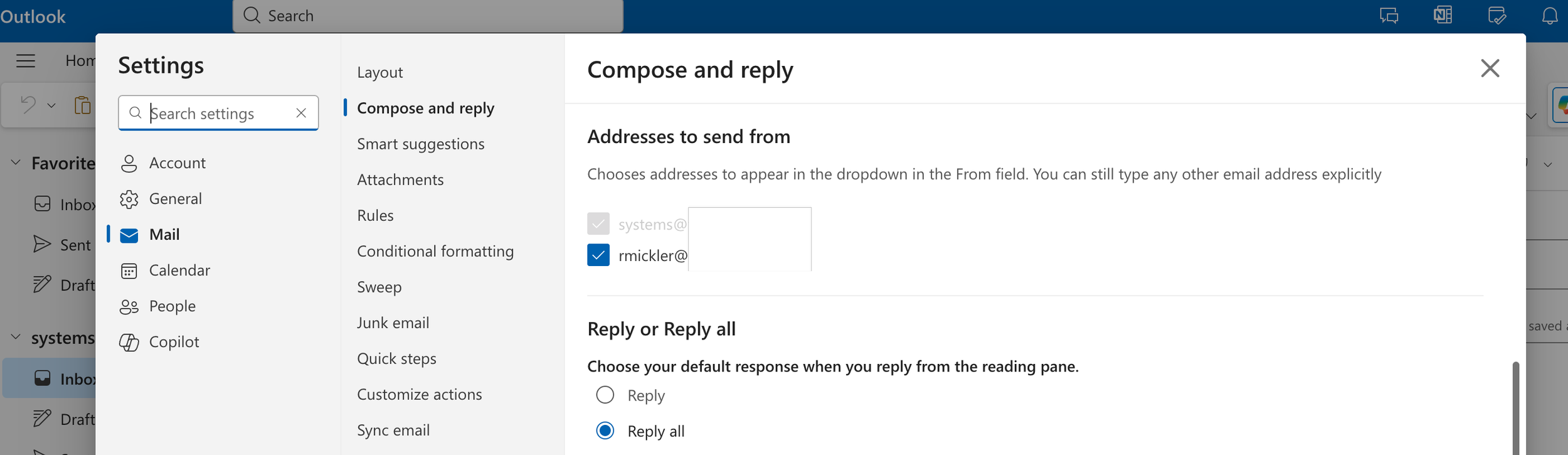
Now, have the user compose a new email in OWA. The From Field should allow a down-select on the check boxed aliases.

Closing and re-opening the thick Outlook client should inherit these settings and allow for regular Send-As functionality in Outlook.
Yeah, life should be easier. Why isn’t it, Microsoft?
R

How to Remove and Block the New Outlook
Want to remove and bar Outlook Monarch — the new version of Microsoft Outlook — from a Windows computer? Here’s how.
Yeah, tired of Microsoft pushing Outlook Monarch (the new version of Outlook) on you? Here’s how to get rid of it.
Before You Proceed
Close Microsoft Outlook.
Close any open Microsoft Office applications.
Remove the new Outlook Client After Install
Open Powershell.
Execute:
Remove-AppxProvisionedPackage -AllUsers -Online -PackageName (Get-AppxPackage Microsoft.OutlookForWindows).PackageFullNameClose Powershell.
Block the Preinstallation Process to Prevent Future Installs
Open the Registry Editor.
Navigate to the following path: HKEY_LOCAL_MACHINE\SOFTWARE\Microsoft\WindowsUpdate\Orchestrator\UScheduler_Oobe
Create a new String Value named BlockedOobeUpdaters.
Set the value data to [“MS_Outlook”] (including the brackets and quotes).
Close the Registry Editor.
Hide the New Outlook Toggle in Outlook 365
Open the Registry Editor.
Navigate to the following path:
HKEY_CURRENT_USER\Software\Microsoft\Office\16.0\Outlook\Options\General
Create a new DWORD32 named HideNewOutlookToggle.
Set the value to 1.
Open Outlook
Outlook 365 will open.
The “Try the New Version” toggle will be removed.
The new version won’t be installed in the future.
R