

Five Signs It's Time to Hire an IT Company Instead of Calling Your "Computer Guy"
Is your computer guy no longer enough? Learn five signs your Vancouver or Portland small business may need professional managed IT support.
I met a small business owner who described their IT support arrangement this way:
“Yeah, we have a computer guy. He’s a fella from my church. We call him when something breaks.”
That arrangement worked fine when the company had four employees, a couple of PCs, and most of their files lived on one computer.
Years later, the business had grown to more than a dozen employees. Their application portfolio consisted of Microsoft 365, SharePoint and OneDrive, and 3rd party cloud applications. They had remote workers, shared files, and hosted critical customer data, but IT was still being handled by the church friend one emergency at a time. Turns out that guy had a full-time job and would have to get to the problem at nights, imposing delays on company operations.
In my experience, that’s usually when the “I’ve got a computer guy” support model starts showing its limits.
For a growing small business, it may be time to hire an IT company when technology has become important enough that preventing problems matters more than simply fixing them.
1. You're Calling for Help Too Often
Occasional computer problems happen, but if someone is regularly calling for help with email, printers, passwords, Wi-Fi, Microsoft 365, or slow computers, those problems are costing more than the repair bill.
Employees lose productive time while someone waits for the problem to be diagnosed and fixed. Professional IT support should look for recurring problems and eliminate them instead of repeatedly treating the symptoms.
2. Nobody Is Watching Your Cybersecurity
Who monitors your computers for malware? Who makes sure security updates are installed? Who checks that former employees no longer have access to company accounts?
If the answer is “nobody,” that's a warning sign.
Small businesses don't necessarily need complicated cybersecurity systems, but they do need someone taking responsibility for basics such as updates, account security, backups, antivirus protection, and employee access.
3. Your Backup Plan Is Mostly Hope
“We back everything up” should be followed by another question: Can you restore it? I think that question gets even more complicated by adding, “Can the church guy restore it when he’s available?”
A backup that hasn't been checked may not be much of a backup. An IT company can monitor backups, address failures, and periodically verify that important business information can actually be recovered.
4. One Person Knows How Everything Works
Your Wi-Fi password, Microsoft 365 administrator account, domain registration, backup system, and network configuration shouldn't exist solely inside someone's head.
Good IT support includes documentation. If your computer person became unavailable tomorrow, another qualified technician should be able to understand your systems and keep the business running.
5. Technology Problems Are Becoming Business Problems
Yikes. This is probably the biggest sign.
When an email outage prevents customers from reaching you, a failed computer stops someone from billing, or a security incident threatens confidential information, you're no longer dealing with a computer problem. You're dealing with a business problem.
For companies with 2–50 employees, managed IT services can provide something the break-fix model generally doesn't: ongoing responsibility for keeping technology reliable, secure, and recoverable.
If your business is reaching that point, Mickler & Associates, Inc. provides professional IT support for small businesses throughout Vancouver, WA and Portland, OR, including cybersecurity, Microsoft 365, cloud services, and managed IT. Contact us and let's talk about what your business actually needs — without making IT more complicated than it has to be.
R

Top Cybersecurity Risks to Small Businesses: How They Impact Operations, Employees, and Consumers
Cyberattacks are a growing threat to small businesses, disrupting operations, stressing employees, and shaking consumer trust. Stay vigilant!
Cybersecurity threats are a growing concern for small businesses. Here are the top risks and their potential impacts:
Phishing Attacks: Phishing emails are one of the most common threats. They trick employees into providing sensitive information or clicking on malicious links. According to a 2023 report by Verizon, 36% of data breaches involved phishing. This can lead to unauthorized access to company data, financial losses, and damaged reputation.
Ransomware: Ransomware attacks can cripple business operations by encrypting essential data and demanding a ransom for its release. The FBI reported a 62% increase in ransomware incidents in 2022. This can halt business activities, leading to significant downtime and financial losses.
Insider Threats: Whether malicious or accidental, insider threats pose a serious risk. Employees with access to sensitive data can leak or misuse information. This can result in legal repercussions and loss of customer trust.
Weak Passwords: Using weak or reused passwords can make it easy for cybercriminals to gain access to systems. A study by NordPass found that 73% of passwords are duplicates. This can compromise the security of multiple accounts and sensitive information.
Software Vulnerabilities: Failing to update software regularly can leave systems vulnerable to attacks. Cybercriminals exploit outdated software to infiltrate networks. Regular updates and patches are crucial to maintaining security.
Impact on Business Operations: Cyberattacks can disrupt daily operations, cause financial losses, and damage the business's reputation. Recovery can be time-consuming and costly.
Impact on Employees: Employees may face stress and uncertainty during and after an attack. They may also be targeted directly, leading to a loss of productivity and morale.
Impact on Consumer Behavior: Customers may lose trust in a business that has experienced a data breach. This can lead to decreased sales and a tarnished reputation.
Stay Vigilant: Implementing strong cybersecurity measures, educating employees, and staying updated on the latest threats are essential steps to protect your small business.
R

Understanding Browser Hijacking
Browser hijacking poses a real threat to small businesses, leading to data breaches, financial loss, and damaged reputation.
Small businesses thrive by leveraging the Internet for operations, marketing, and communication. However, this dependency exposes them to cybersecurity threats, including browser hijacking.
Browser hijacking occurs when unauthorized software alters how your web browser operates without your consent, often redirecting you to malicious websites, changing your homepage, or inserting unwanted ads. For a small business, this can mean more than just a nuisance; it can lead to data breaches, financial loss, and damaged reputation.

A great example is when a browser is hijacked to display a fictitious message about a computer’s security. This is a great example of scareware:
Its warning is contained within the confines of the browser window.
It’s big and scary.
It includes an immediate, irrational call-to-action to dial a telephone number.
Sometimes, it may be difficult to close this window.
Recent studies show that browser hijacking has become increasingly sophisticated, with attackers using it as a gateway to deploy further malware or to steal sensitive information directly. The risk is heightened for small businesses that may not have the robust cybersecurity defenses of larger corporations. According to the Cybersecurity and Infrastructure Security Agency (CISA), small businesses are the target of 43% of cyber-attacks, many of which begin with seemingly benign browser hijacking.
The biggest risk, of course, is that somebody actually calls the number. If you ever see something like this, use Task Manager in Windows to kill the browser, or, restart your PC. Your machine’s not harmed — they’re just trying to trick you into believing it is so you’ll call that number — leading to criminal fraud. Heck, just send me a screenshot in email and I’ll give you some practical advice for getting rid of it.
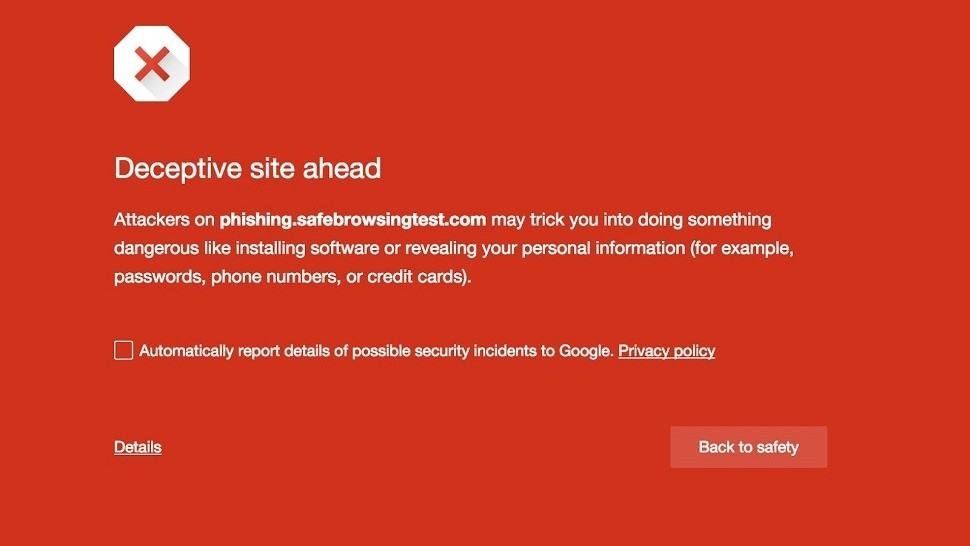
Luckily, Google is on the forefront of protecting users. Chrome can help detect when a user is going to a known-bad site and intercept the hijack with a warning that looks something like this.
The impact on small businesses can be severe. A hijacked browser can redirect customers away from your site, eroding trust and reducing sales. More alarmingly, it can be used to gather sensitive information, such as login credentials and financial data, leading to financial theft or identity theft. The recovery from such attacks involves immediate IT costs, potential legal fees, fines, and long-term brand damage.
To protect your business, it's essential to educate your team on recognizing and avoiding suspicious links and attachments, maintain up-to-date antivirus software, and regularly back up critical data. Implementing strong, unique passwords and multi-factor authentication can also add an extra layer of security.
In conclusion, the threat of browser hijacking is real and potent, especially for small businesses. By understanding the risks and taking proactive steps to mitigate them, businesses can safeguard their operations, protect their customers, and secure their future in the digital marketplace.