

How Does Google Drive File Stream Know it's Me?
An explainer for how Google Drive File Stream authenticates to Google to allow access to your Google Drive.
So yah - how does File Stream know to use your Google Drive?
Well, when it runs for the first time, Google Drive File Stream asks a G-Suite user to sign in.
The act of signing-in is the process by which File Stream is then authorized to access to the user’s Google Drive.
Once authenticated, File Stream will present a redirected drive with a My Drive folder labeled G: in Windows; it’ll be represented as a device within the Mac O/S.
The My Drive folder is the root of the user’s Google Drive and - generally - the content placed in My Drive is private to the user.
Where G-Suite Basic users will only see their own My Drive folder, G-Suite Business users would see their My Drive folder and their G-Suite domain’s Shared Drives (formerly known as Team Drives). Only the G-Suite Business license has access to Shared Drives.
When File Stream is active, it creates a runtime stub that appears in the system tray of a Windows computer; a small white and gray triangle near the computer’s clock displayed in the lower right side of the screen. On a Mac, File Stream’s runtime stub appears in the upper toolbar towards the right.
In both cases, the stub will look grayed-out if the user needs to sign in. Clicking on the stub will produce a login challenge that will re-authenticate File Stream. If the stub is blue then the user is currently logged-in.
The user’s credential is cached in the form of an oAuth token and is active for a period of time or until the token is revoked. Then the user would have to sign back in again. If the user rotates their G-Suite password, they would need to sign-in again to create a new oAuth token.
While logged in, the computer user has access to the Google Drive of the signed-in G-Suite user.
Hopefully they’re the same person! The person using the computer is using their account with File Stream and that login information is stored behind the Windows or Mac user account.
If not, the user will notice that the File Stream stub has an option to “switch user” or “disconnect” to reconnect File Stream under another user account.
File Stream cannot connect to multiple user accounts or Google Drives at one time.

What is the Difference Between Google Drive File Stream and Google Drive Backup and Sync?
A brief explainer on why you would want to use either Google Drive File Stream or Google Drive Backup and Sync.
Okay you’ve likely seen both of these products. So what’s the diff?
Google Drive can be used by both non-commercial (free Gmail) and commercial (G-Suite) users. And in Google’s mind, these two types of users require different things out of a cloud storage solution.
Understanding Google’s assumptions about these two classes of users helps explain why there’s a schism in the product-line and not just one huge universal application for Mac’s and PC’s called Google Drive.
Non-Commercial Users - Google Drive Backup and Sync
Now, Google presumes that non-commercial users just need a convenient way to back-up files on their computer and that’s what Google Drive Backup and Sync does.
When a file is added to the user’s desktop (or any folder of their choice), the user’s data is instantly backed-up to the user’s Google Drive. When a file is changed on the computer, it’s sync’d with Drive; if a file is changed in the cloud, then it’s sync’d with the computer. Those files then follow the same rules as any other file found in the user’s Google Drive.
So this is a common backup and sync process. It offers some degree of convenience in that users can access their critical files anywhere through Google’s ecosystem - even through the Google Drive App, for example.
However, Backup and Sync’s main purpose is disaster recovery. If the PC gets lost, stolen, or destroyed, all the user would need do is install Google Drive Backup and Sync again and their critical files would be restored to their new machine. Easy peasy.
Still, we can’t ignore Google’s business model when examining this product. Backup and Sync is an up-sell opportunity for Google. The more data a user is backing up through Backup and Sync, the more cloud storage they’ll need, the more storage they have to buy, and the more storage that’s populated with juicy consumer data, the more it can use that data for marketing (remember: non-commercial users are offered a free application for a reason). Like many things on the Internet, Google is offering a utility that extends value and convenience to their users at the price of their privacy.
Commercial Users - Google Drive File Stream
Google Drive File Stream works a bit differently.
It creates a virtual disk drive that redirects to the user’s Google Drive. In this case, the file isn’t actually stored on the user’s computer or sync’d when there’s changes. File Stream just presents files in a way so that they can be streamed to the user on demand from the cloud.
This makes a lot of sense in corporate environments.
For starters, corporations tend to have many more files than what a typical PC could store on its own disk drive. Backup and Sync is impractical for this purpose since its function is to synchronize files between the PC and the Google Drive; so much corporate data would quickly fill up the hard drive of a PC especially in the age of SSD’s (Solid State Drives).
Secondly, corporations have a security concern. They don’t want to leave files on uncontrolled endpoints (like PC’s) where they could be read or copied. Corporations want to rotate a user’s password and deny access; File Stream allows for that.
Thirdly, Goggle presumes that the non-commercial user doesn’t need to share their files to others in real time, unlike the corporate world where two or more people may be trying to access the same file at once. There needs to be a means of managing file contention for binary files like Word, Excel, PowerPoint or PDF files, and that’s only provided by Google Drive File Stream.
Finally, corporate users have centralized file shares that they want to make available to their team. File Stream gives the user access to the G-Suite domain’s Shared Folders.
When to Use Both
Practically, the G-Suite user could use both applications - Backup and Sync to protect the data on their local hard drive and File Stream to access their Google Drive and their company’s Shared Folders. G-Suite users are covered under a different End User License Agreement that retains the confidentiality and privacy of their data, unlike non-commercial users.
That’s not a bad strategy for the G-Suite user, particularly if the user doesn’t have any other form of file backup on their computer and if the user wants to centralize their cloud activities to Google and leverage that storage investment.

What is Google Drive File Stream?
A brief explainer covering what Google Drive File Stream is and how it can be used by G-Suite users to quickly access their Google Drive from a Mac or PC.
Google Drive File Stream is software developed and maintained by Google that is downloaded and installed on a target computer. When Google has updates this software, updates are pushed to existing installations and the computer is automatically updated.
Google Drive File Stream is a file system redirector. It creates a virtual disk drive on a PC or Mac. Once installed, File Stream is used to allow Google G-Suite users an easy way to access their Google Drive through their own operating system as if it were a local disk drive.
This product is only available to G-Suite users; regular non-commercial Google users use Google Drive Backup and Sync.
When installed on a Windows computer, the redirector attempts to map a local drive G: but it will use the next available drive letter if necessary.
On a Mac computer, the redirector creates a separate Device under the Finder’s Device listing which can be navigated within Finder.
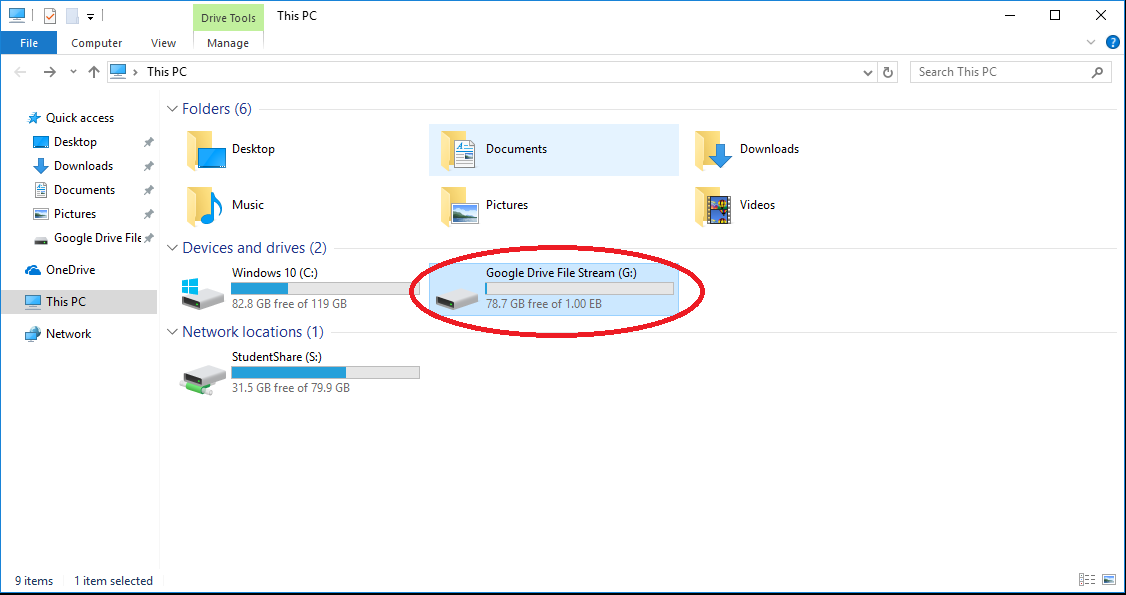
File Stream brings enterprise-level controls to cloud-based storage. It simplifies the use of Google Drive by making it appear like a normal disk drive in the user’s operating system, increasing the likelihood of adoption.
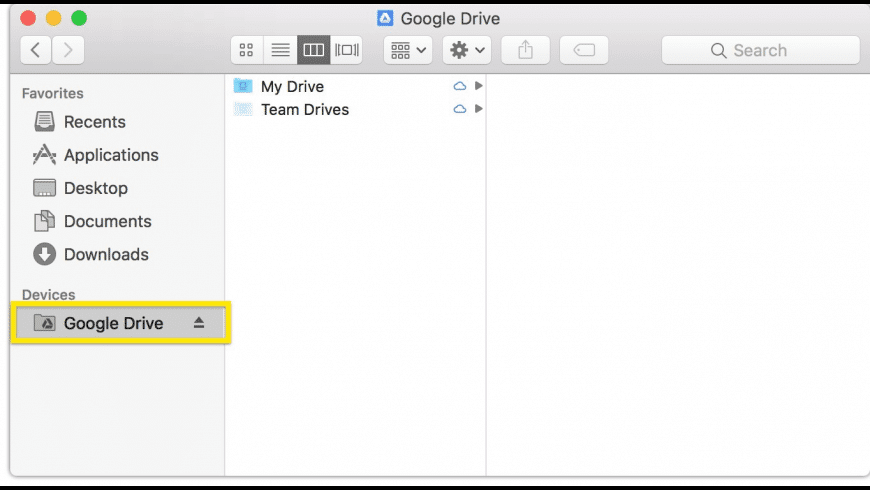
Instead of having the user navigate files via the web browser, the use can just drag and drop files like they normally would with any other disk drive.
Local applications like Word and Excel work seamlessly with Google Drive because those applications just see the Google Drive as another disk drive.
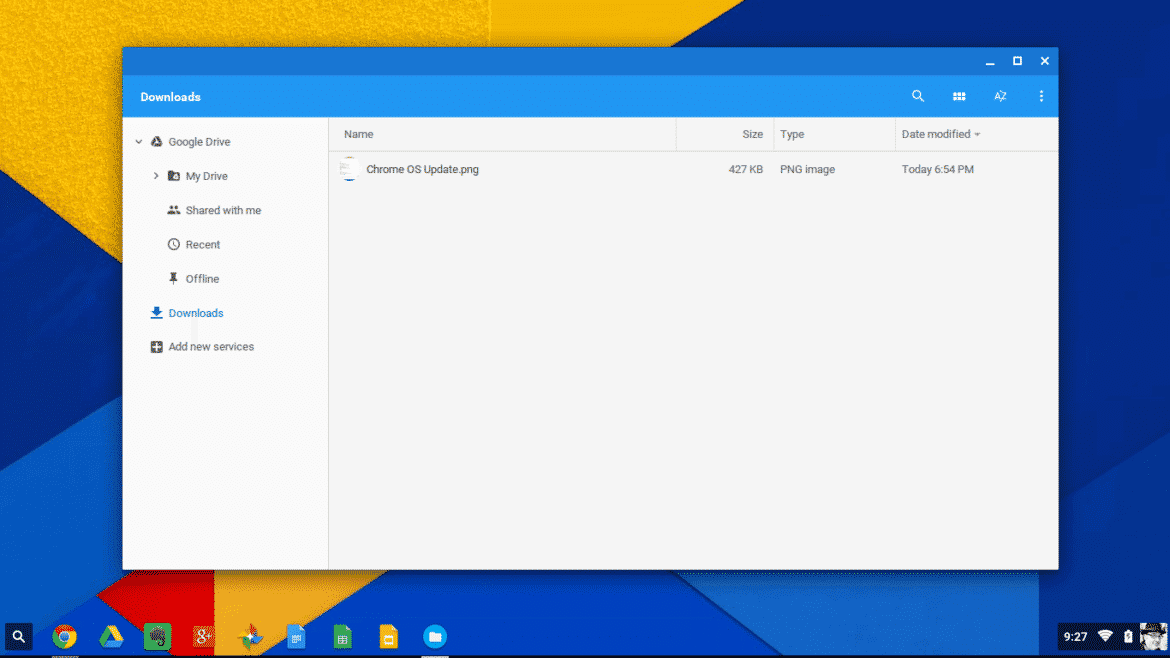
File Stream isn’t necessary on a Chromebook or Chromebox because its features are automatically built-in through its Files App. When a Chromebook user accesses their files, the Chromebook is already redirecting to their Google Drive and is navigable by the user.
Furthermore, File Stream isn’t offered as a product for mobile platforms like Android or iOS because the Google Drive App fulfills that function.
Helpful Videos:
Related Articles:
What is the Difference Between Google Drive File Stream and Google Drive Backup and Sync?
How Does Google Drive File Stream Work?
Is Google Drive File Stream Safe?
The Problem of File Contention with Google Drive File Stream
When You Wouldn’t Want to Use Google Drive File Stream